Welcome to SiteBlazer!
You can preview your website anytime to see how it looks before going live.
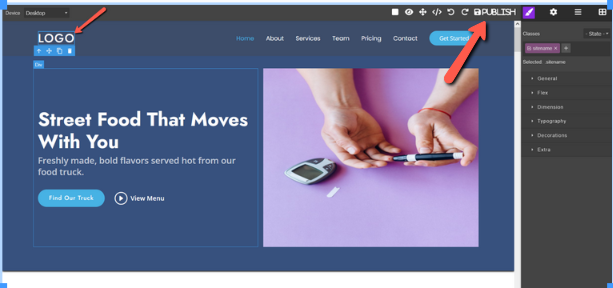
When you are happy with everything, you can publish your website with one click so everyone can see it online.
Preview Your Website (Check Before Going Live)
Before showing your website to customers, it’s important to check everything once.
1. Check How Your Website Looks
Make sure everything looks neat and clear:
- Layout – Check that the header, menu, and footer are in the right place
- Colors – Ensure the colors match your brand and look good
- Text & Fonts – Text should be easy to read
- Images – Images should load properly and look clear
- Mobile View – Check your site on mobile, tablet, and desktop screens
This helps you see your website the same way your visitors will see it.
2. Test Buttons and Links
Click and test everything:
- Buttons – Make sure all buttons work
- Links – Check that links open the correct pages
- Forms – Test contact or enquiry forms
- Other features – Sliders, menus, or dropdowns should work smoothly
This step helps avoid problems after your site is live.
Launch Your Website (Go Live)
When everything looks good, you are ready to publish your website.
1. Click the Publish / Launch Button
- This button makes your website live on the internet
- Your work is saved and shared online
2. Your Website Is Now Live
- Your website is now open to everyone
- Anyone can visit your site using your website link
Final Note
Previewing your website before launching helps you:
- Avoid mistakes
- Look professional
- Give visitors a better experience
🎉 Congratulations!
Your website is now published and ready for visitors.
